Full Circle Prayer
Full Circle Prayer
Experiencing the Joy of Prayer
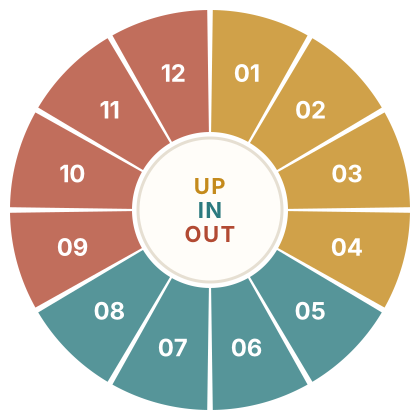
Learn to pray through twelve simple movements as we look UP to God, welcome His work IN us, and pray OUT for others and the world.
UP Presence
- 01 Be Still
- 02 Praise
- 03 Give Thanks
- 04 Pray the Word
IN Formation
- 05 Listen
- 06 Surrender
- 07 Confession
- 08 Intercede
OUT Mission
- 09 Pray for Full Circle Prayer and the Church
- 10 Pray for Nashville, TN
- 11 Pray for Your Nation
- 12 Pray for the World
Be encouraged— every minute in prayer matters. Anonymous session totals only. Names, notes, and prayer requests are never collected.
Don’t have time for all 12 movements? Choose movements
Prayer tools & settings Pause & sound · Phone tools · Feedback
Distraction-free prayer: iPhone Guided Access or Android App Pinning
iPhone · Guided Access
- Open Settings → Accessibility → Guided Access and turn it on. Set a passcode or Face ID.
- In Guided Access settings, set Display Auto-Lock to Never so the screen stays on.
- Return to this page in Safari and triple-click the side button.
- Optional: circle any part of the screen you do not want to respond to touch.
- Tap Start. Triple-click the side button again when you are done.
After praying: set Display Auto-Lock back to your usual time if you do not want the screen to stay on.
Apple’s Guided Access instructions
Android · App Pinning
- Open Settings → Security & privacy → More security settings → App pinning and turn it on. Menu names vary by phone.
- Return to this page in Chrome, then open your recent apps.
- Tap the Chrome icon above its preview and choose Pin.
- When you are finished, use the unpin gesture your phone shows.
Android’s App Pinning instructions
A website cannot turn these on for you, so set them up before you tap Begin Prayer.
Add Full Circle Prayer to your Home Screen
iPhone · Safari
- Open this page in Safari.
- Tap the Share button.
- Scroll down and tap Add to Home Screen.
- Leave Open as Web App on if it appears, then tap Add.
See Apple’s illustrated instructions
Android · Chrome
- Open this page in Chrome.
- Tap the three-dot menu beside the address bar.
- Tap Add to Home screen, Create shortcut, or Install app.
- Confirm the name and tap Add or Install.
Help us improve Full Circle Prayer. Try a session and tell Buck: What helped you pray? What confused you? What interrupted you? Please include your phone and browser, but no private prayer requests.
Email BuckUp next
“The insistent prayer of a righteous person is powerfully effective.” James 5:16 WEB
Your notes are not kept after you close. Save a copy to your device, or copy them into your journal.